DIY Planner Stickers Printable Bundle
DIY Planner Stickers Printable Bundle – A Hands‑On Review
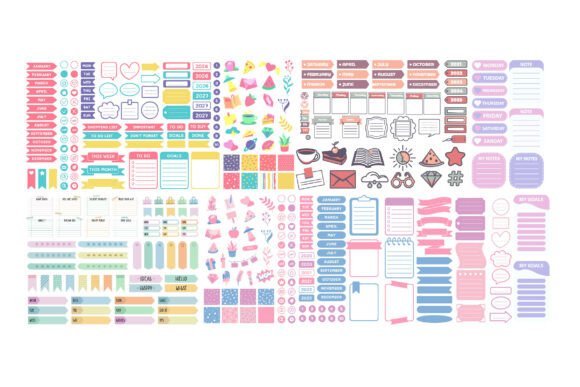
If you love customizing your planner, journal, or calendar, the DIY Planner Stickers Printable Bundle is the creative boost you’ve been waiting for. Hand‑drawn, colorful tab icons are crafted for both digital and printable planners, giving you endless flexibility without sacrificing style.
What’s Inside the Bundle?
- 💎 385 SVG files – perfect for Cricut, Silhouette, Brother ScanNCut, and any software that reads vector graphics.
- 📁 385 PNG files – high‑resolution images with transparent backgrounds for quick drag‑and‑drop.
- 📄 385 PDF files – ready‑to‑print on any home printer.
- 🗂️ 1 EPS & 1 AI file – ideal for Adobe Illustrator, CorelDraw, or Inkscape power users.
- 📐 1 DXF file – compatible with Silhouette Studio Basic Edition.
Key Features That Make This Bundle Stand Out
- Hand‑drawn design: Each icon feels personal, adding a boutique‑style flair to any layout.
- Versatile categories: From “To‑Do” and “Meeting” to “Yoga,” “Vacation,” and “Birthday,” the set covers every facet of daily life.
- Multi‑platform compatibility: Works seamlessly with Cricut Design Space, Silhouette Designer Edition, Sure Cuts A Lot (SCAL), and more.
- Instant download: Get all files the moment you purchase—no waiting, no shipping fees.
- Scalable vectors: Resize without losing quality, whether you’re creating a tiny tab or a bold header.
Why It’s Perfect for:
- Digital planner enthusiasts: Import SVGs directly into your favorite planning app.
- Printable planner lovers: Print PNGs or PDFs for a tactile, scrapbook‑style feel.
- Students & professionals: Organize assignments, meetings, workouts, and meals in one glance.
- Busy lifestyles: Quick‑click stickers keep you on track without the clutter of endless notes.
- Crafters & cut‑machine owners: Use the SVG, DXF, EPS, or AI files with Cricut, Silhouette, ScanNCut, or any cutting software.
How to Use the Files – Quick Guide
- SVG: Load into Cricut Design Space, Silhouette Designer Edition, or SCAL for cutting.
- DXF: Open in Silhouette Studio Basic for precise cutting.
- EPS / AI: Edit in CorelDraw, Inkscape, or Adobe Illustrator for custom colors.
- PNG: Drag‑and‑drop into digital planner pages or print on sticker paper.
- PDF: Print directly; ideal for 8.5×11” planner inserts.
Final Verdict
The DIY Planner Stickers Printable Bundle delivers a massive library of beautifully hand‑drawn icons that are instantly usable across digital and printable platforms. Its extensive file formats and compatibility with leading cutting machines make it a powerhouse for anyone serious about planner personalization. Whether you’re a student juggling assignments, a professional managing meetings, or a creative soul who loves a splash of color, this bundle will elevate your planning game and keep you motivated day after day.
Ready to level‑up your planner? Click “Add to Cart” now and start decorating your schedule with style and efficiency!
```
📚 You Might Also Like
Commercial License Included