Music Notes
Music Notes Design – The Ultimate Clip‑Art Pack for Every Creative Project
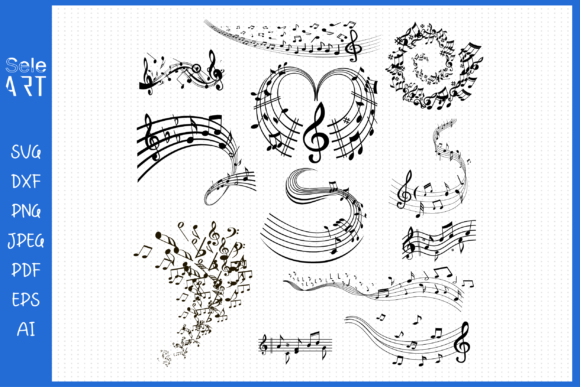
Looking for a versatile, high‑quality music‑note set that works flawlessly on Cricut, Silhouette, and all other cutting machines? This Music Notes design collection delivers exactly that. Whether you’re making custom mugs, t-shirts, decals, or even scrapbooking layouts, the crisp, vector‑based files give you limitless creative freedom.
- 12 SVG files – Scalable, machine‑ready shapes that cut cleanly and look sharp at any size.
- 12 PNG files – Transparent, high‑resolution images perfect for digital printing and overlay projects.
- 1 DXF file – Native CAD format ready for laser cutting or engraving machines.
- 1 AI file – Adobe Illustrator source for advanced editing and color adjustments.
- 1 EPS file – Industry‑standard format that works in Illustrator, InDesign, and CorelDRAW.
**Why This Set Stands Out**
• Universal Compatibility – Works out of the box with Cricut Maker, Silhouette Cameo, and even older machines like the Cricut Explore. No conversion required.
• Ready‑to‑Use Templates – Each SVG comes pre‑arranged for quick assembly. Just import, arrange, and cut.
• High Definition Detail – The original artwork is created at 300 dpi, ensuring flawless prints on mugs, t-shirts, and invitations.
• Creative Freedom – Mix and match the notes, change colors, or layer them over backgrounds to create invitations, birthday cards, car decals, and wall art.
**Ideal Projects**
- Mugs & Drinkware – Print or iron‑on the notes for personalized coffee cups.
- T‑Shirts & Apparel – Cut and heat‑transfer to create music‑themed fashion.
- Party Decor – Design overlays, banners, and cupcake toppers for birthdays or music festivals.
- Invitations & Greeting Cards – Layer the notes onto cardstock for a musical touch.
- Scrapbooking & Wall Décor – Cut stickers or decals to decorate albums or rooms.
- Car Decals & Stickers – Use the DXF for precise car decal cutting.
**How to Get the Most Out of Your Download**
- After purchase, you’ll receive a ZIP folder containing all files.
- Extract and open your chosen file format in the corresponding software.
- Import into your cutting machine’s design software and set the appropriate settings.
- Cut, print, or transfer the pieces onto your finished product.
- Enjoy stunning, professional‑looking results with minimal effort.
Elevate your crafting game today with the Music Notes design suite – the perfect blend of convenience, quality, and creative potential. Happy crafting!
📚 You Might Also Like
Commercial License Included