Simple Daisy Flower Icons
Simple Daisy Flower Icons: A Minimalist Must‑Have for Designers
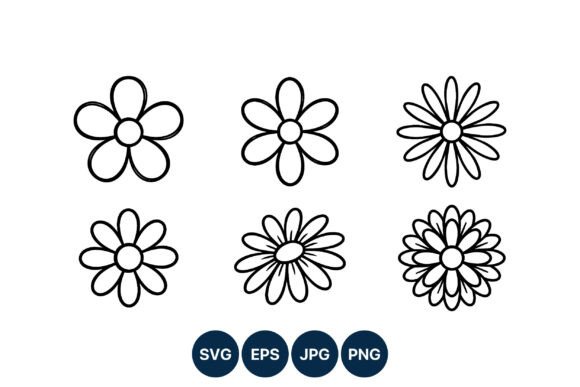
Looking for a fresh, clean icon set that adds a touch of nature without clutter? The Simple Daisy Flower Icons pack delivers six beautiful, black‑and‑white daisy illustrations, each featuring a unique petal count. Whether you’re building a website, designing a flyer, or crafting a mobile app, these icons blend seamlessly into any color scheme while retaining sharpness at every scale.
Key Features at a Glance
- 6 distinct daisy designs – varying petal counts for visual variety
- High‑contrast black lines on a white background – perfect for eye‑catching UI elements
- Clean, minimalistic line art – no unnecessary details, just pure elegance
- Two rows layout – quick reference and easy comparison
- Multiple file formats: SVG, PNG, JPG, EPS – versatile for web, print and vector work
- 100% vector (SVG/EPS) – infinite scalability without loss of quality
- Ready‑to‑use ZIP package – instant download and instant implementation
Why These Icons Stand Out
In the design world, less is more. These daisy icons embody that philosophy by offering a bold silhouette without over‑detailed strokes. Their high‑contrast black outlines are instantly recognizable, making them ideal for:
- Website navigation buttons and call‑to‑action icons
- Print graphics such as brochures or business cards
- Mobile app UI elements (e.g., “Add to Favorites” or “Nature” category tags)
- Educational materials or handmade craft templates
Technical Excellence
All files are delivered in a single ZIP folder, ensuring you have everything you need for a smooth workflow:
- SVG – scalable vector graphic for web and digital use.
- EPS – perfect for high‑resolution print or Adobe Illustrator edits.
- PNG & JPG – ready‑to‑use raster files for quick implementation.
The vector nature guarantees crisp edges on retina displays and large prints alike, while the raster files let you skip the conversion step for instant deployment.
Installation & Customization Tips
- Unzip the folder and locate the file format that matches your project.
- Open the SVG or EPS in your vector editor to adjust colors, stroke width, or add subtle gradients if desired.
- Export to PNG for web use, preserving the 100% black/white contrast for a timeless aesthetic.
Download Now – Free for Personal & Commercial Use
Ready to elevate your next design project? Click the link below to download the Simple Daisy Flower Icons pack and unlock a versatile, high‑quality icon set that’s ready to use right out of the box.
```
📚 You Might Also Like



Commercial License Included